

What are Ruby Apps?
Ruby Apps are software applications built using the Ruby programming language, often leveraging the Ruby on Rails framework. These apps run on a server and power dynamic websites, APIs, and web services.
🔍 In cPanel Context
When you see “Ruby Apps” in cPanel, it refers to a feature (often powered by CloudLinux + Passenger) that allows users to:
- Host and run Ruby-based web apps (like Rails, Sinatra, or Jekyll)
- Configure Ruby environments (select version, install gems)
- Launch apps via a
config.rufile (used by Passenger) - Manage app lifecycles (start/stop/restart) from a GUI
🧱 Examples of Ruby Apps
- Ruby on Rails websites (e.g., Basecamp, GitHub’s early backend)
- Sinatra apps – lightweight microservices
- Jekyll – static site generator for GitHub Pages
- Custom scripts using Ruby gems
✅ Key Features of Ruby Apps in cPanel
- App isolation: Each Ruby app runs in its own virtual environment.
- Environment control: Choose Ruby versions and gemsets per app.
- Web integration: Apps are served via Apache + Passenger with friendly URLs.
💡 Why Use Ruby Apps?
- Rails is known for rapid development of web applications.
- Ruby’s clean syntax and convention-over-configuration philosophy speeds up development.
- Built-in tools for testing, security, and API generation.
🛠️ Prerequisites
- A cPanel hosting account with Ruby App support (via CloudLinux’s
mod_passenger) - SSH access (for bundle install, migrations, etc.)
- Rails app ready to deploy (Git repo, tarball, etc.)

How to Manage Ruby Apps in cPanel
To manage Ruby apps in cPanel, follow the steps below:
-
⚙️ Enable Ruby App Support in cPanel
- Log in to cPanel.
- Scroll to the Software section.
- Click Setup Ruby App (or “Ruby Applications”).

-
🏗️ Create a Ruby App
- Click Create Application.
- Fill out the form:
- Ruby version: Choose the version that matches your app.
- App Directory: Path where the app will live (e.g.,
myrailsapp). - App URI: Public URL endpoint (e.g.,
/myapp).
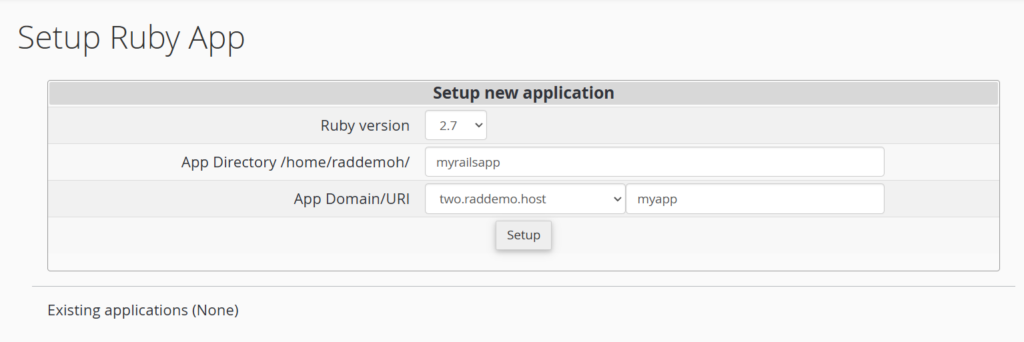
- Click Setup.
After creation:
- cPanel sets up the environment in your app folder.
- You’ll see a command like:
source /home/youruser/rubyvenv/myrailsapp/2.7/bin/activate
-
⬇️ Upload Your Rails App
You can use:
- Git clone: Best for active development.
- Upload ZIP/tarball: Then extract using File Manager or SSH.
Place your app inside the App Directory you chose earlier.
-
📦 Install Gems
- Open Terminal or SSH into the server.
- Activate the environment:
source ~/rubyvenv/myrailsapp/2.7/bin/activate
cd ~/myrailsapp
bundle install --deployment
Tip: Some gems (like
pgormysql2) may need native extensions. Ensure your cPanel server has the appropriate libraries installed.
-
🔧 Configure the App
- Edit
config/database.ymlto match your cPanel MySQL credentials. - Create the DB:
RAILS_ENV=production rake db:create
- Run migrations:
RAILS_ENV=production rake db:migrate
Optional: Run
assets:precompilefor production:RAILS_ENV=production rake assets:precompile
- Edit
-
🚀 Set the Startup File in cPanel
- Go back to Setup Ruby App in cPanel.
- Click Edit for your app.
- Set:
- App Startup File:
config.ru - App Entry Point: leave blank (Passenger uses
config.ruautomatically)
Click Update to apply changes.
- App Startup File:
-
🌐 Set Up the Domain or Subdomain
You can:
- Map a subdomain (e.g.,
app.domain.com) to the app directory. - Use a Rewrite Rule or
.htaccessin the main domain’s root to proxy requests.
Example
.htaccessfor Proxying:RewriteEngine On RewriteRule ^myapp(.*)$ http://localhost:3000$1 [P]
Note: Not needed if using cPanel’s built-in URI mapping during app setup.
- Map a subdomain (e.g.,
-
🔄 Restart or Manage App
In the Ruby App Manager:
- Click Stop, Start, or Restart.
- Use the Terminal to check logs, restart manually, etc.
-
🧪 Troubleshooting Tips
Issue Solution 500 Internal Server Error Check log/production.log,passenger.log, ortmp/restart.txtGems not installed Make sure you bundle installafter activating the environmentDatabase errors Double-check database.ymland runrake db:create db:migrateAssets not loading Run RAILS_ENV=production rake assets:precompileand ensure public/assets is accessible
📁 File Structure Consideration
Keep your app structured as a standard Rails app:
myrailsapp/
├── app/
├── config/
│   └── ru
├── db/
├── public/
├── log/
└── Gemfile
🔐 Bonus: Secure Your App
- Use SSL (via AutoSSL in cPanel or Let’s Encrypt).
- Set production environment properly (
RAILS_ENV=production). - Rotate secrets in
config/master.keyandcredentials.yml.enc.
✅ Summary – How to Manage Ruby Apps in cPanel
| Task | Tool |
|---|---|
| Create app environment | cPanel → Ruby App |
| Deploy app files | SSH, Git, File Manager |
| Install gems | bundle install (in venv) |
| Configure DB | database.yml, rake db:* |
| Launch App | cPanel Startup File → config.ru |
| Manage app | cPanel or Passenger restarts |
Conclusion
You now know how to manage Ruby apps in cPanel.
✅ Easy Website Management with cPanel Support
Running a business is hard enough — managing your website shouldn’t be. That’s why we include full cPanel support with every hosting plan:
- ✅ Simple Dashboard – No tech skills needed. Easily manage your website, emails, and more from one place.
- ✅ Quick App Installs – Launch WordPress, shopping carts, or other tools with just one click.
- ✅ Professional Email – Create business email addresses (like you@yourbusiness.com) in minutes.
- ✅ Reliable Backups – Keep your website safe with easy-to-use backup and restore options.
- ✅ Secure & Protected – Manage your site’s security and SSL certificates with built-in tools.
- ✅ Real Help, Anytime – Our expert support team is available 24/7 for anything you need.
💬 What Our Customers Say
“I have had nothing but good experiences with Rad Web Hosting. The staff is there to help you to make sure that you stay online and I haven't had any downtime with my server in the time I have been with Rad Web Hosting and I have had my server for over two years.”
— Janice L., Owner of RJGM
🏆 Trusted by Small Business Owners Nationwide

🚀 Get Started Today
Take the stress out of website management. With cPanel support and expert help just a click away, you can focus on what matters most — growing your business.
Choose Your Plan Now






[…] Ruby on Rails […]