


This article provides a guide for how to add user to sudoers in Debian VPS.
What is Sudo?

Sudo provides users with administrator-level permissions on your Debian system without needing to know the root password, making for a safer way of working as extra privileges can be granted or removed without having to change passwords.
Configuration for Sudo privileges can be found in the /etc/sudoers file, and we will add a new user to it and give them administrator rights in this article.
Compare Debian VPS Plans
How to Add User to Sudoers in Debian VPS
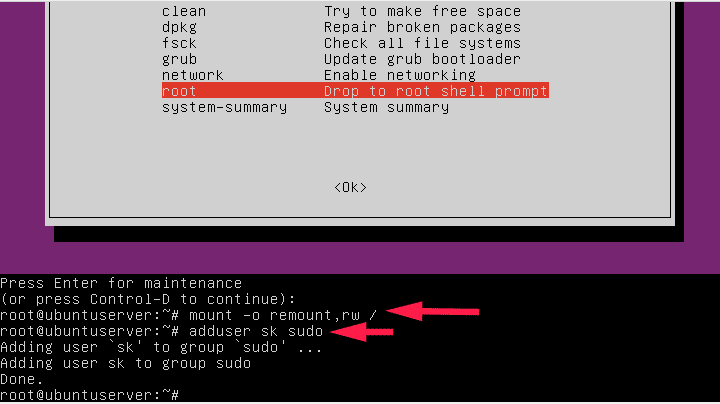
To grant someone sudo privileges, they must first be added to the sudoers file. This can be accomplished in either of two ways: either adding them as members of the sudo group in system settings or by using visudo command.
To add someone to sudoers, it is first necessary to create their account.
-
Create a New User
The /etc/sudoers file provides rules defining which users or groups are granted sudo privileges at what levels. By default, members of the sudo group automatically obtain root access on Debian systems.
Sudo allows a user to temporarily run commands as another user – usually root (system administrator). This is useful for tasks requiring elevated privileges or those which would otherwise be hazardous for non-administrators to complete.
If you need to create a new user, using the adduser command is an easy and efficient way to do it. This command will create a home directory, copy files over, and configure other settings for the new account.
- Login to SSH as root user.
- Run the following command:
adduser new-username
where, new-username is the user to be created
Once a user has been created, you can check if they have been added to the sudoers file by running the whoami command with root privileges. This command displays their current privileges; if “root” appears as its output then you have successfully added them to sudoers file.
-
Create a Password
When creating a new user, you have the option of assigning that individual sudo privileges. To do so, create a password for them – when they log in they’ll be asked for their password before being granted access.
To do this, type the following command into a terminal:
passwd new-username
where, new-username is the user to create a password for.
-
Add the User to the Sudoers Group
Sudo is a command-line utility that enables users to run commands with root privileges. To grant someone access, add them to the sudoers group quickly and easily; when using sudo they are prompted for their password before running the command; providing added protection from unintentional accessing. However, periodically review which users have sudo access in order to ensure it is still necessary and that weak passwords aren’t being utilized.
As the first step in adding users, make sure that those you want to add belong to either the sudo or wheel groups.
To add the new user to the Sudoers group, run the following command from the terminal as the root user:
usermod -aG sudo new-username
where, new-username is the user to add to sudoers.
Once a user is part of either the sudo or wheels group, their next step should be editing /etc/sudoers file to grant them access to sudo. You can use visudo as an editor of this file.
Conclusion
You now know how to add user to sudoers in Debian VPS. For additional assistance configuring your Debian VPS from Rad Web Hosting, please contact our support team.






[…] A non-root user with sudo privileges (See: How to Add User to Sudoers in Debian VPS) […]